MINEO Assistant
MINEO Assistant is a powerful AI agent designed to enhance your coding and data analysis experience within MINEO.
The MINEO Assistant integrates advanced AI capabilities into MINEO to simplify and improve your interactions with Python Notebooks. Powered by Large Language Models (LLMs), the Assistant offers three powerful modes:
- Automated Notebook Creation - Generate complete notebooks from simple prompts
- Contextual Block Assistance - Get tailored help with code, markdown, and data visualizations
- Interactive Error Resolution - Understand and fix errors with AI-guided assistance
Common Features
The Assistant is available for the following elements:
- Code (Python) blocks
- Markdown blocks
- Table and Chart widgets
- Whole notebook creation (via the New menu)
For users without code editor permissions, only the Table and Chart widgets will have the Assistant enabled. See Permissions.
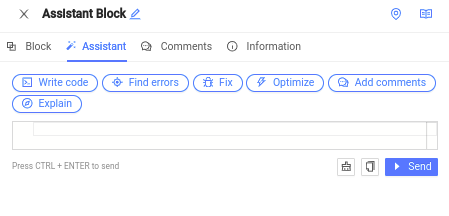
To access the Assistant, click the magic wand button in any block toolbar to open the Assistant sidebar. Alternatively, if the block sidebar is already open, you can click on the 'Assistant' tab of the sidebar.
From there, you can simply type your question or prompt for the Assistant, or use one of the suggestion presets.
You can have an independent conversation for each block of your notebook, and the suggestions will depend on the type of your currently focused block. Note that assistant conversations are not persisted or saved in MINEO and are only available until you close your browser tab.
You can use Markdown in your prompts or ask the assistant to format things in markdown
Automated Notebook Creation
MINEO Assistant can transform your ideas into complete, ready-to-run notebooks with just a few simple prompts. This powerful feature saves you time and effort by automating the entire notebook creation process.
How to generate a notebook
-
Access the Generator:
- Click the "+" button in the navigation panel
- Select "AI Generated Notebook" from the dropdown menu
-
Define Your Requirements:
- Enter a detailed prompt describing your analysis goals, preferred techniques, or specific questions
- Be as specific as possible about data sources, methodologies, and desired outputs
-
Review and Execute:
- The Assistant will generate a complete notebook with both educational content and functional code
- Each generated notebook is immediately runnable and can be customized to your needs
Crafting effective prompts
The quality of your prompt significantly impacts the generated notebook. Here are examples of effective prompts organized by complexity:
Basic Analysis Requests:
- "Create a notebook that visualizes customer demographics from a CSV file"
- "Generate a notebook that demonstrates basic pandas data cleaning techniques"
Intermediate Analysis Requests:
- "Build a notebook that performs sentiment analysis on customer reviews with visualizations"
- "Create a notebook for time series forecasting of monthly sales data using ARIMA models"
Advanced Analysis Requests:
- "Generate a notebook that builds a recommender system using collaborative filtering"
- "Create a comprehensive COVID-19 data analysis notebook with interactive visualizations and statistical modeling"
What you get
Each generated notebook is carefully structured to provide both educational value and practical utility:
- Comprehensive Structure: Clear sections that guide you from data import to final conclusions
- Educational Content: Markdown blocks explaining concepts, methodologies, and interpretation guidelines
- Production-Ready Code: Executable Python code with appropriate error handling and best practices
- Visualizations: Data visualization code that helps communicate insights effectively
- Customization Options: Comments suggesting potential modifications or extensions
Benefits
- Accelerated Development: Jump-start your analysis with a complete working notebook
- Learning Tool: Understand new techniques through detailed explanations and working examples
- Standardization: Generate notebooks that follow consistent patterns and best practices
- Exploration: Quickly test different analytical approaches with minimal setup time
Example:
Contextual Block Assistance
The Assistant provides intelligent, context-aware help for individual blocks in your notebook. Whether you're writing code, crafting explanations, or visualizing data, the Assistant understands what you're trying to accomplish and offers relevant guidance.
Using the assistant with code blocks
The Assistant becomes your coding partner when working with Python code blocks:
- Guided Coding: Get step-by-step guidance as you write code, with suggestions tailored to your specific task
- Code Generation: Request specific implementations or have the Assistant write code based on your description
- Optimization: Ask the Assistant to improve your existing code's performance, readability, or functionality
- Explanation: Get detailed explanations of how your code works or how to implement specific features
- Debugging: Identify and fix issues in your code with intelligent suggestions
Example prompts:
- "Write a function to preprocess this DataFrame for machine learning"
- "Optimize this code for better performance"
- "Add comments explaining how this algorithm works"
- "Convert this pandas code to use vectorized operations"
You can use the action buttons in the assistant response to copy, add or replace the code of the current block
Enhancing markdown blocks
Transform your explanations and documentation with AI assistance:
- Creating Rich Content: Generate well-structured, visually appealing markdown content
- Formatting Assistance: Convert plain text to properly formatted markdown with headings, lists, and emphasis
- Explanation Generation: Create clear explanations of concepts, methodologies, or results
- Documentation: Generate comprehensive documentation for your analysis or models
Example prompts:
- "Write an introduction explaining time series forecasting"
- "Format this text as a structured markdown with headings and bullet points"
- "Create a summary of my analysis results for presentation"
- "Help me explain this statistical concept in simple terms"
Data interpretation assistance
Get intelligent insights from your data visualizations and tables:
- Automated Analysis: Let the Assistant interpret patterns, trends, and outliers in your data
- Insight Generation: Receive meaningful observations that might not be immediately obvious
- Explanation Translation: Convert technical statistical findings into easily understandable language
- Suggestion Generation: Get recommendations for further analysis or visualization approaches
Example prompts:
- "What insights can I draw from this scatter plot?"
- "Explain the key trends in this time series chart"
- "Help me interpret these correlation values"
- "What conclusions can I draw from these results?"
Interactive Error Resolution
The Assistant transforms error messages from frustrating roadblocks into valuable learning opportunities. When you encounter errors, the Assistant helps you understand, fix, and learn from them.
Understanding errors
The Assistant provides clear explanations of error messages and exceptions:
- Error Translation: Convert cryptic error messages into plain English explanations
- Root Cause Analysis: Identify the underlying issues causing the error
- Context-Aware Diagnosis: Understand how your specific code is triggering the error
Getting intelligent solutions
Beyond just explaining errors, the Assistant offers practical solutions:
- Fix Suggestions: Receive specific code modifications to resolve the error
- Alternative Approaches: Learn different ways to accomplish your goal without triggering the error
- Best Practices: Understand how to avoid similar errors in the future
Learning from mistakes
Each error becomes a learning opportunity:
- Conceptual Clarification: Understand the programming concepts related to the error
- Pattern Recognition: Learn to identify common error patterns
- Debugging Skills: Develop better debugging strategies for future challenges
How to use error resolution
When you encounter an error:
- Share the Error: Copy the error message and send it to the Assistant
- Provide Context: Include the code that caused the error for more accurate help
- Ask Specific Questions: Request exactly what you want to understand or fix
Example prompts:
- "Why am I getting this KeyError and how do I fix it?"
- "Explain this IndexOutOfBoundsException and suggest a solution"
- "Debug this code that's giving me a TypeError"
- "What does this memory error mean and how can I avoid it?"