Query
This widget allows you to run SQL queries directly within your data application. You can also interpolate values from the Python context into your queries, making it possible to customize your queries dynamically based on the context of your notebook.
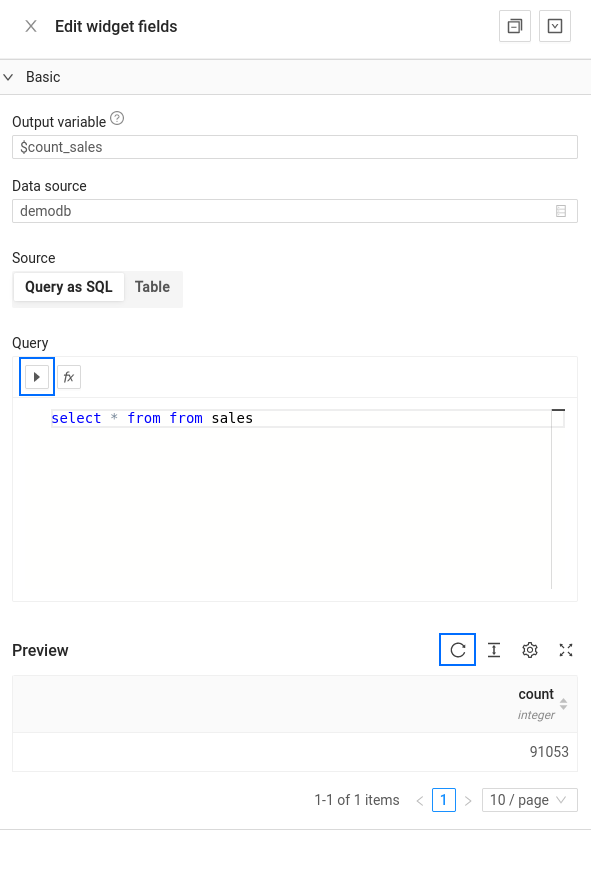
Query widgets have no visual output, so you after configuring them you can mark them as hidden so that they do not affect your data app visually.
Basic usage
To just explore your data, you can just simply select some of the configured data sources and then a table name
After that , the widget will inform you that the name configured in the Output variable field will be available in your notebook context. You can use that output variable name in other widgets such as table widget or chart widget
Advanced usage
To use this widget, you need to have some understanding of SQL. You can write your queries in the widget's text box, and then execute them by clicking the "Run Query" button. The results of your query will be displayed in a table below.
Interpolating Values
You can interpolate values from the Python context into your SQL queries prefixing some variable name with a dollar ($). For example, if you have a Python context variable named table_name, you can interpolate its value into your query as follows: SELECT * FROM $table_name.
Make sure that the table_name variable is defined in the Python context and has the desired value. Click the Run Query button to run the query and display the results in the table below.
Reading data from a query
If you want to read data from a query in a python block, you have two methods:
When you read a query from your python code and store the result, it gets materialized into the worker's memory. This could become a problem with very large queries.
As a pandas dataframe
output_df = output_variable.to_dataframe()
As a python list
output_list = list(output_variable)
API reference
| Field Name | Description |
|---|---|
| Output variable | The name of the Python context variable that will hold the results of the query. |
| Data source | The name of the database connection or data source to use for the query. |
| Source | The type of data source to use, either a raw SQL query or a pre-existing database table. |
| Query | The actual SQL query to run, if the Source is set to "Query as SQL". |
See also
- All widgets — browse the full widget catalog.
- Table — display your query results.
- Form for data sources — let users filter a query interactively.